As the crypto industry continues to grow, security has become more important than ever. Binance, being one of the largest cryptocurrency exchanges in the world, has made identity verification a key requirement for all users.
KYC, or Know Your Customer, is not just a formality. It helps protect user accounts, reduces fraud, and ensures that the platform is not used for illegal activities. For everyday users, it simply means a safer trading environment.
Whether you’re new to crypto or already trading regularly, completing KYC is now an essential step.
Step-by-Step KYC Process on Binance
Create Your Binance Account

Start by visiting the official Binance website or using the mobile app. Sign up using your email address and create a strong password.
After registration:
Verify your email
Log in to your account
Complete basic profile details like your name and date of birth
Start Identity Verification
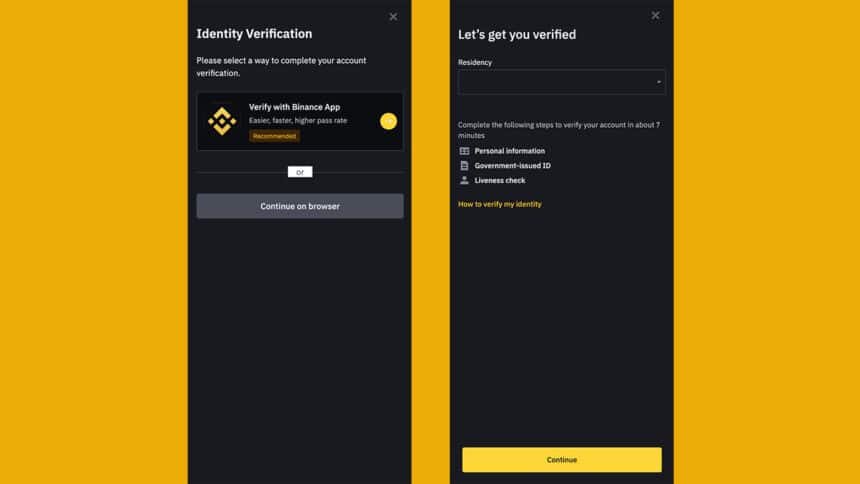
Once your account is ready, go to your profile or security section. Look for the "Identity Verification" option and click on "Start Verification". This will begin the KYC process.
Choose Your Verification Level
Binance offers different levels of verification. While basic verification gives limited access, advanced verification unlocks full features like trading, deposits, and withdrawals. For most users, completing full verification is the better option.
Upload Required Documents

At this stage, you’ll need to submit some documents to verify your identity.
Typical requirements include:
A valid government-issued ID (such as a national ID, passport, or driving license)
Proof of address (like a utility bill or bank statement)
Make sure your documents are:
Clear and readable
Not expired
Uploaded in supported formats like JPG or PNG
Complete Face Verification
You may also be asked to complete a quick face verification. This usually involves taking a selfie or recording a short video.
Ensure:
Good lighting
No obstructions on your face
Stable camera position
Submit and Wait for Approval
After submitting everything, Binance will review your information. Verification usually takes a few hours, but in some cases, it may take up to a couple of days. You’ll receive a notification once your account is verified.
Required Documents Explained
| Type of Document | Examples | Important Notes |
|---|---|---|
| Identity Proof | Passport, National ID, License | Must be valid and not expired |
| Address Proof | Utility bill, Bank statement | Should match your profile info |
| Face Verification | Selfie or video scan | Clear and well-lit image |
How Long Verification Takes
| Step | Estimated Time |
|---|---|
| Account Registration | 2–3 minutes |
| Document Submission | 5–10 minutes |
| Verification Review | Few hours to 48 hrs |
Benefits After Completing KYC
Once your verification is complete, you get full access to Binance features.
This includes:
Buying and selling cryptocurrencies
Access to trading markets
Higher withdrawal limits
Stronger account protection
It also reduces the chances of account restrictions in the future.
Common Mistakes to Avoid
Many users face delays simple errors. Avoid these to speed up your verification:
Uploading blurry or cropped images
Using expired documents
Entering incorrect personal details
Poor lighting during face verification
Taking a few extra minutes to double-check everything can save you time later.
Conclusion
Binance’s KYC process is designed to make crypto trading safer for everyone. While it may seem like a small hurdle at first, it plays a big role in protecting your account and funds.
The process itself is simple if you follow each step carefully. Once completed, you can use the platform with confidence and access all its features without limitations. If you’re serious about crypto, completing your KYC is one of the smartest first steps you can take.